
M999 Game Payment Methods
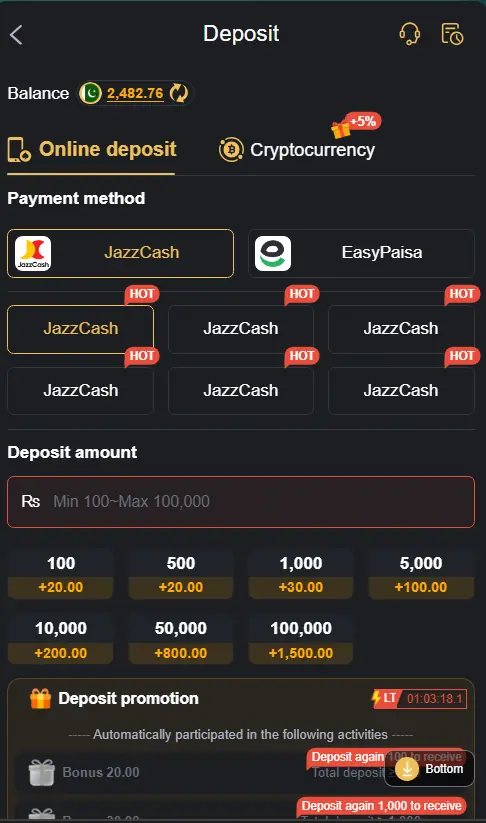
M999 Game provides a payment section where Pakistani users can manage deposits and withdrawals through available local payment options. Depending on the account and platform availability, users may see methods such as JazzCash, EasyPaisa, or bank transfer.
Before making any transaction, check the payment details carefully and confirm the current options shown inside your M999 account. Users should also avoid sharing wallet passwords, OTPs, or other private information with anyone.
Supported Payment Methods on M999 Game
| Payment Method | Availability | Usage |
|---|---|---|
| JazzCash | Available | Deposit & Withdrawal |
| EasyPaisa | Available | Deposit & Withdrawal |
| Bank Transfer | May Be Available | Selected Transactions |
How to Deposit Money on M999 Game?
Follow these basic steps:
Step 1: Log In to Your Account
Open the M999 Game app and sign in with your registered account.
Step 2: Open the Wallet
Go to your account dashboard and find the wallet or balance section.
Step 3: Select Deposit
Tap the Deposit option to view the available payment methods.
Step 4: Pick a Payment Method
Choose JazzCash, EasyPaisa, or another option displayed in your account.
Step 5: Enter the Amount
Enter the amount you want to deposit and check it carefully.
Step 6: Review Payment Details
Make sure the wallet number and other transaction information are correct.
Step 7: Complete the Payment
Follow the instructions provided for your selected payment method.
Step 8: Check Your Balance
After the transaction, check your M999 account to see whether the balance has been updated.
How to Withdraw Money from M999 Game?
If withdrawals are available on your account, the general process is:
Step 1: Sign In
Download the M999 Game, and register to account successfully.
Step 2: Go to Wallet
Open the wallet, balance, or payment section.
Step 3: Choose Withdraw
Tap the Withdraw option to view the available methods.
Step 4: Select a Method
Choose an available option such as JazzCash or EasyPaisa.
Step 5: Enter Withdrawal Details
Add the required wallet information and withdrawal amount.
Step 6: Check Everything
Review the details carefully before sending the request.
Step 7: Submit the Request
Confirm the withdrawal and wait for the platform to process it.
Step 8: Check Your Wallet
Once processed, check your selected payment account for the transaction.
Important Tips for Safe Transactions
- Double-check your wallet number before making a payment.
- Use your own payment account whenever possible.
- Never share your OTP, PIN, or password with anyone.
- Use a stable internet connection during transactions.
- Keep transaction records or screenshots for reference.
- Check the platform’s current payment rules before depositing or withdrawing.
- Contact official support if a transaction remains unresolved.
Common Deposit & Withdrawal Issues
| Issue | Possible Solution |
|---|---|
| Deposit Not Showing | Refresh the account and allow some processing time. |
| Wrong Wallet Number | Check the payment information before submitting. |
| Withdrawal Pending | Wait according to the platform’s stated processing time. |
| Payment Failed | Check your payment balance and internet connection. |
| Money Not Received | Keep the transaction details and contact official support. |
Conclusion
M999 Game includes a wallet section for managing available deposits and withdrawals, with local payment options such as JazzCash and EasyPaisa depending on current availability. The process is generally organized into simple steps so Android users can understand where to make or request a transaction.
Always verify payment information before confirming a transaction and protect your financial details. Online gaming involves financial risk, so users should only spend money they can afford to lose and follow applicable local laws and platform rules.